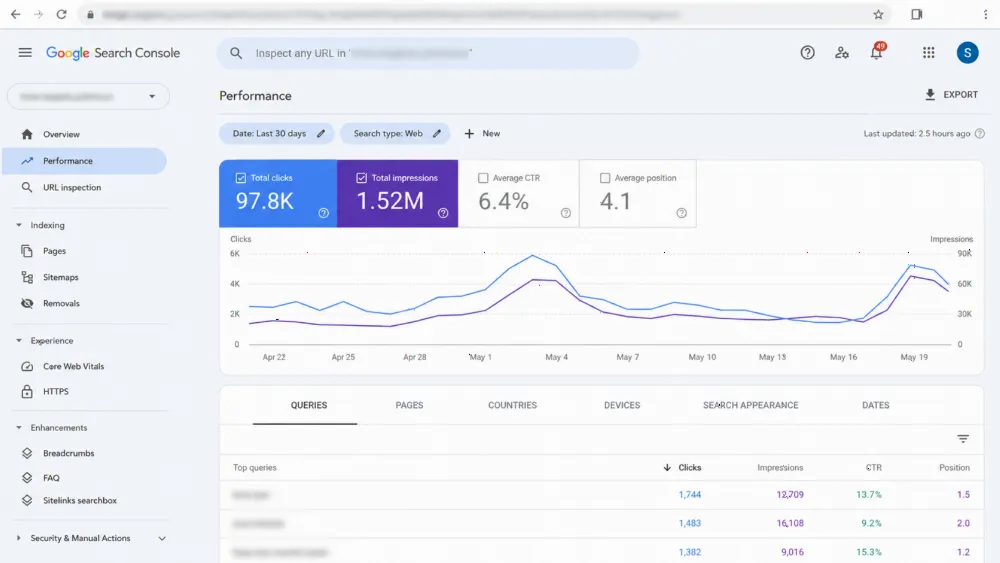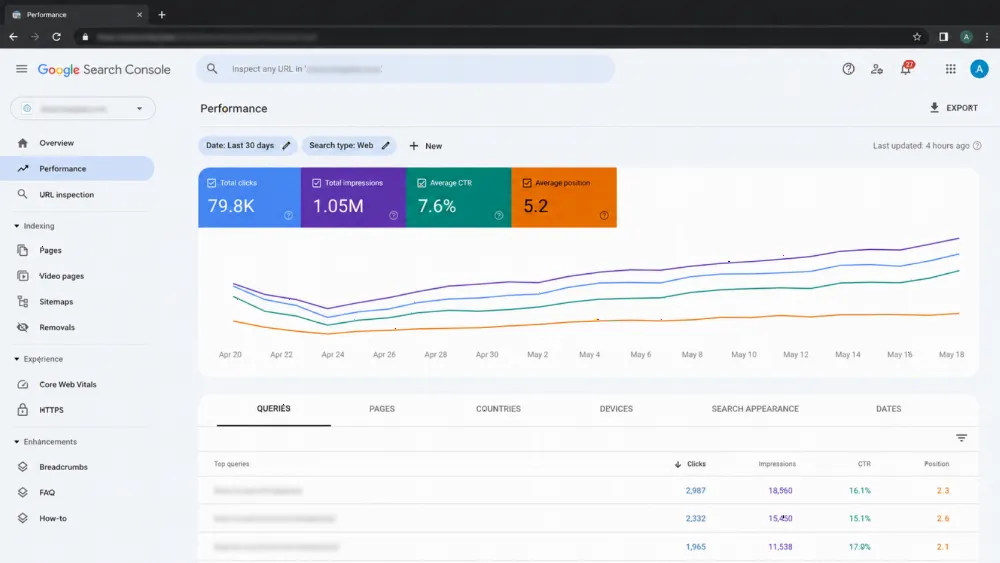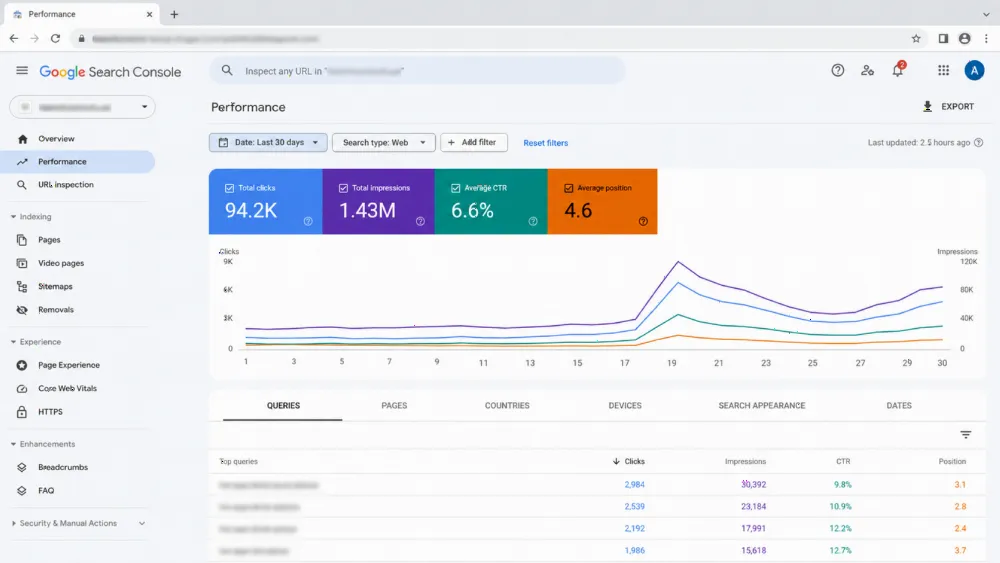
Programmatic SEO publishes thousands of targeted pages from a database instead of writing each one by hand — and it's how companies like Zillow and TripAdvisor dominate US search. This guide shows you the full system: data, templates, tech stack, technical SEO, and how to avoid Google's scaled-content penalties.
You don't build the pages. You build the machine that builds the pages. That single mindset shift is worth more than any tool subscription: one template plus a clean database can generate 5,000 genuinely useful pages for the same effort it takes a team to write 50. Consider the alternative — Ahrefs found that 96.55% of all pages in its index get zero Google traffic, largely because they were published without keyword research or backlinks behind them (Ahrefs study via SEO Site Checkup).
"Nearly 97% of web pages on the internet get literally zero traffic from Google." — Rand Fishkin, citing Ahrefs data
Done badly, programmatic SEO is spam. Done well, it's the highest-leverage growth channel available to US marketplaces, directories, SaaS companies, and multi-location service brands. Our data-driven SEO team builds and monitors these systems — here's exactly how they work.
Want the machine built for you? WebStackRank ships Next.js-powered programmatic builds with schema, internal linking, and indexation monitoring baked in from day one.
What is programmatic SEO, exactly?
Programmatic SEO (pSEO) is a publishing system: a central database feeds structured data into pre-designed page templates, generating hundreds or thousands of landing pages automatically. Each page targets one specific long-tail query — "best plumbers in Austin," "CRM software for dentists," "Mailchimp vs ConvertKit."
The math is simple. Multiply your head terms (what you offer) by your modifiers (location, industry, integration, comparison) and you get your addressable page count. Ten head terms × 500 modifiers = a 5,000-page roadmap.
What separates pSEO from old-school article spinning: every page must answer a real query with real, unique data. Google's scaled content abuse policy — enforced through the March 2024 core update — targets mass-produced pages with no added value. Pages built on genuine data with useful structure survive; doorway pages die. Read our companion piece on programmatic SEO + AI content ops for the spreadsheet-first workflow.
Why does programmatic SEO work so well in the US market?
Three reasons, all structural. First, scale: the US has 50 states, 3,000+ counties, and 19,000+ incorporated cities — no manual content team can cover that geography query by query. Second, competition: broad head terms ("accounting software," "home repair") are owned by enterprise giants, while long-tail programmatic queries are winnable. Third, economics: after the infrastructure is built, publishing page 10,001 costs about the same as publishing page 11.
The pattern also fits American search behavior. Long-tail queries convert disproportionately well because intent is explicit — someone searching "water heater installation cost in Dallas" is far closer to buying than someone searching "water heater." Our B2B SEO strategy guide shows how to map those queries to pipeline stages.
How do you build the keyword and data foundation?
Data comes before design. Every successful programmatic program starts with a keyword research database organized around scalable modifiers:
| Modifier type | Example pattern | Business fit |
|---|---|---|
| Geographic | "[Service] in [City]" | Multi-location services, directories |
| Industry | "[Software] for [Industry]" | SaaS, B2B tools |
| Comparison | "[Product A] vs [Product B]" | Software, ecommerce |
| Integration | "Connect [App A] to [App B]" | SaaS platforms |
| Template/example | "[Industry] invoice template" | Tools, resources |
Fill the database with genuinely unique data per row — not just the modifier. A "cost of living in [City]" page needs real numbers: median rent, average salary, tax rates, drawn from public APIs, government datasets, or your own anonymized platform data (Zillow's housing reports are the gold standard here). Google's own guidance is blunt: if the only difference between 1,000 pages is the city name, they're doorway pages. Check the query patterns against Google's spam policies on scaled content abuse before you build.
Pitfall to avoid: scraping data without rights or publishing scraped lists verbatim. Synthesize multiple sources into an insight that doesn't exist elsewhere — a comparison table, a calculator, an interactive map — and you've crossed from "thin" to "valuable."
What makes a programmatic page template rank?
One flawed template multiplied 10,000 times is 10,000 flawed pages. Nail the template once and quality scales with quantity. Every high-performing programmatic template includes:
- Dynamic title and meta: "Best [Service] in [City], TX | [Brand]" — keyword-first, location-specific.
- Dynamic H1 stating the exact query intent.
- Intro paragraph blending static framing with data variables (population, market size, local context).
- Unique data visualizations: pricing tables, comparison charts, or maps generated from your database — this is what makes the page uncancellable by competitors.
- Dynamic FAQs answering modifier-specific questions (this also feeds FAQ schema).
- One contextual CTA matched to the page's intent — book, compare, or download, not all three.
Conditional logic multiplies uniqueness: if population > 1M, show metro-specific guidance; else, show small-city guidance. Two data-driven branches beat one generic paragraph every time. Template performance should be validated on fast, SEO-ready US builds — a slow template fails at scale.
Which tech stack should you use: custom code or no-code?
| Custom stack (Next.js/Nuxt) | No-code (Webflow, Softr, WordPress) | |
|---|---|---|
| Best for | 10,000+ pages, full SEO control | Fast launches under ~10,000 pages |
| Rendering | SSR/SSG out of the box | Varies; verify crawler output |
| Speed | Fastest possible | Good, but heavier at scale |
| Cost profile | Higher upfront, cheaper at scale | Lower upfront, pricier per-page at scale |
| SEO control | Total — schema, canonicals, headers | Constrained by platform |
Choose custom when programmatic SEO is your core growth channel and you need server-side rendering, programmatic schema, and millisecond control. Our Next.js development agency builds exactly this: database → template → static pages with perfect technical SEO. Choose no-code to validate the concept fast — Webflow + Whalesync or WordPress + WP All Import can ship a pilot in weeks. Avoid client-side-only rendering either way: if a crawler sees an empty shell, your 10,000 pages are 10,000 invisible pages. Pair the decision with headless CMS development when editors need to manage the data layer.
How do you handle technical SEO at programmatic scale?
Publishing is half the job. Thousands of new URLs strain crawl budget and architecture — this is where most pSEO programs quietly die.
Indexation management. Split XML sitemaps by section (sitemap-locations.xml, sitemap-comparisons.xml) and keep them pristine: 200-status indexable URLs only. Use the Indexing API to ping Google on publish, and watch Search Console's crawl stats weekly — "Discovered, not indexed" at scale means your architecture, not your content, is the bottleneck.
Internal linking. Orphaned programmatic pages don't rank. Build a directory hierarchy (yoursite.com/locations/ → /locations/texas/ → /locations/texas/austin/), add dynamic "nearby" and "related" widgets to every template, and implement breadcrumbs. Link equity has to flow downhill to thousands of leaves.
Dynamic schema. Hard-code JSON-LD into the template with database variables injected — LocalBusiness for location pages, SoftwareApplication for comparisons, FAQPage for the dynamic FAQs. Validate with Google's Rich Results Test. Our technical SEO audit catches the schema and crawl issues that kill programmatic rollouts.
How do you avoid Google's scaled-content penalties?
Ask one question per page: does this give the searcher something they can't get from a generic result? If yes, you're safe. If the page exists only to capture the keyword, it's a liability.
Three guardrails that keep programs alive:
- Uniqueness ratio: at least half of each page's substantive content must come from data variables, conditional logic, or user-generated content (reviews, Q&A) — never static boilerplate with a swapped city name.
- Search-demand filter: don't generate pages for modifiers with zero search volume. Index bloat burns crawl budget and invites spam classification.
- Human-in-the-loop: automate generation, but sample-review pages weekly and fully review your top-traffic templates monthly. AI hallucinations in product data are a liability issue, not just an SEO one.
The winners treat pSEO as a product: instrumented, iterated, and improved. The losers treat it as a publishing trick. Google's algorithms are very good at telling the difference now.
How do you measure and scale a programmatic program?
Track by cluster, not by page. Group pages by modifier (all Texas pages, all comparison pages) and monitor: indexation rate per cluster, impressions and clicks per cluster, and template-level engagement (time on page, scroll depth, CTA conversion). Kill or rebuild clusters that don't index within 60 days — more pages won't fix a broken template.
Then iterate the system: expand the database with new data columns (each new column is a new uniqueness lever), A/B test template variants on a subset of pages, and feed winning patterns back into the master template. One template improvement compounds across every page it generates — that's the whole point.
Frequently asked questions
Is programmatic SEO against Google's guidelines?
No — automation itself isn't the violation. Google penalizes scaled content abuse: mass-produced pages with little or no added value. Programmatic pages built on unique data, genuine utility, and real user value comply with the guidelines. The March 2024 core update specifically targeted low-value scaled content, not the methodology.
How many pages do you need for programmatic SEO to work?
There's no minimum, but the economics kick in around 500+ pages. Below that, manual content is usually more efficient. Most successful programs run 1,000–100,000 pages. Start with a 200-page pilot cluster, prove indexation and traffic, then expand.
How long does programmatic SEO take to show results?
Expect 3–6 months for meaningful traffic. Google needs time to discover, crawl, and evaluate thousands of new URLs, and new pages rarely rank in weeks. Programs that publish 5,000 pages and check back in 14 days always conclude "it doesn't work" — prematurely.
What's the difference between programmatic SEO and AI-generated content?
Programmatic SEO is a system architecture (database → template → pages); AI content is a production method. They combine well — AI can draft descriptions from your data — but pSEO doesn't require AI, and AI-written blog posts aren't pSEO. The ranking factor is always the same: unique value per page.
Do programmatic pages need backlinks to rank?
They need authority, which usually means links to the section or domain rather than every page. Strong internal linking from high-authority hub pages plus a few earned links to flagship programmatic pages typically suffices. Ahrefs' data shows pages without any backlinks rarely earn traffic — don't launch 10,000 orphans and hope.
Can small businesses use programmatic SEO?
Yes, with narrower scope. A 30-location service business can run location + service pages (a few hundred URLs) on no-code tooling. The principles are identical; only the infrastructure budget changes. Start with the modifier that has the clearest search demand.
Ready to build the machine? WebStackRank designs programmatic SEO systems — data architecture, Next.js templates, schema, and indexation monitoring — for US businesses ready to scale. Contact us or start with a technical SEO audit to see if your site can support the scale.