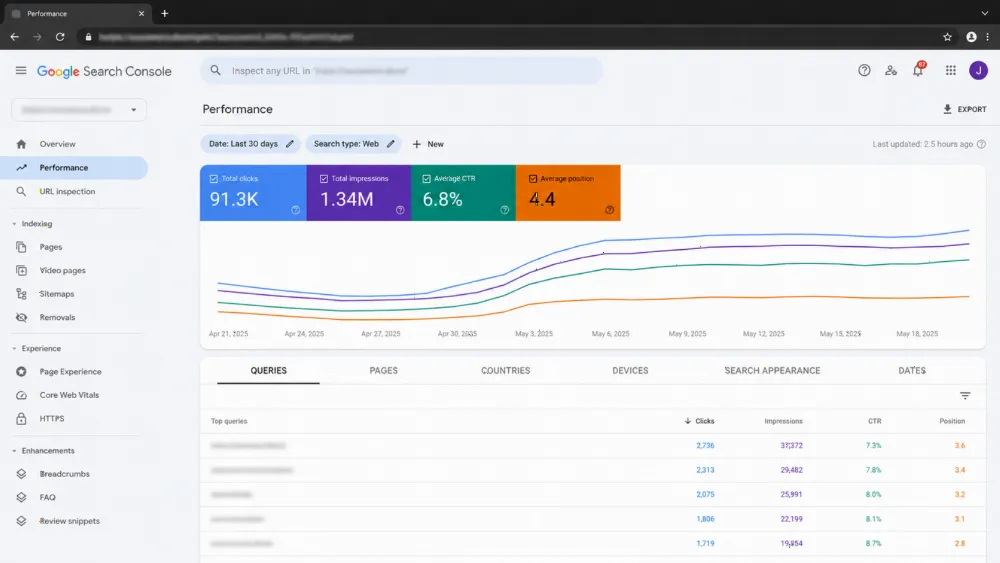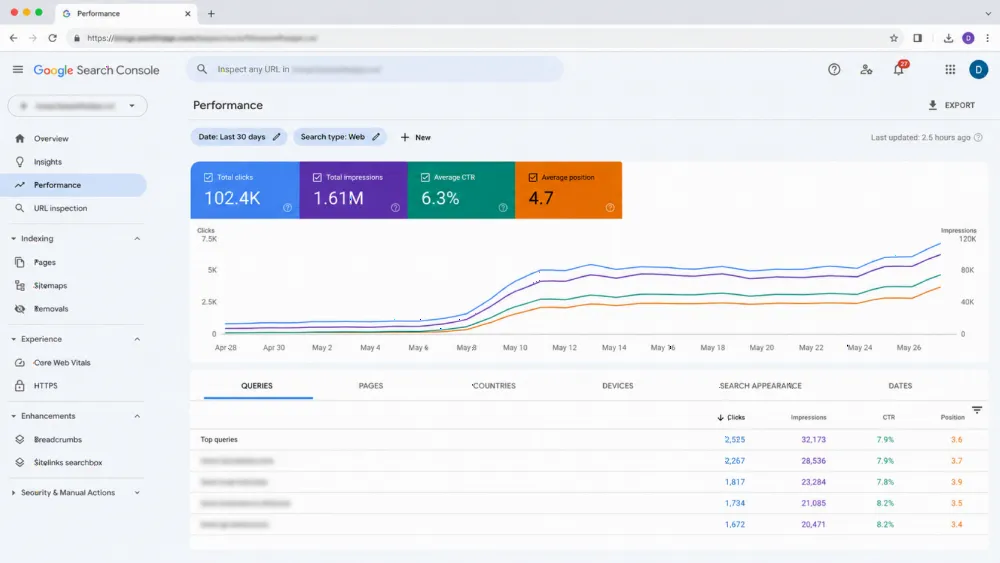
Great dental website design turns local searches into booked appointments. That means a headline naming your specialty and city, a phone number that's always visible, scheduling patients can complete themselves, honest price ranges, and dedicated pages for the treatments patients look up most — implants, Invisalign, veneers, emergency care. The rest is optional; these are what fill chairs.
If your site isn't converting traffic into appointments, get an instant quote for a fixed-price dental website rebuild — most practice sites launch in under six weeks.
What does dental website design actually mean in 2026?
Dental website design blends three crafts into one: clear clinical communication that explains treatments honestly, conversion design that removes friction between a visitor's curiosity and a confirmed booking, and local SEO that puts the practice in front of nearby searchers.
The stakes are higher than most practices realize. A Software Advice survey found that 72% of patients use online reviews as their first step when choosing a new doctor — and the website is where that shortlist gets judged. Patients arrive after comparing three or four practices on their phones. They expect fast loads, genuine photos of the team and office, published price ranges, and booking that doesn't require a call. Miss any one of those and the practice one result lower gets the appointment. The broader playbook is covered in our conversion-focused website framework, and dental is one of the verticals where generative search visibility for local clinics now decides who gets discovered first.
Why do most dentist websites quietly lose patients?
Ugly isn't what kills most dental websites. They were designed around what the dentist likes instead of what an anxious new patient needs. "Welcome to our family" headlines, stock-photo smiles, and no prices anywhere — while the nervous new patient is really asking three things: whether their insurance is accepted, when they can get in, and what it will cost?
Those losses never show up in a report — but they show up in revenue. Plenty of practice sites attract a thousand monthly visitors and book fewer than ten of them — while competitors with working online scheduling, published prices, and substantive treatment pages book four to five times more from identical traffic. With the lifetime value of a new patient running well into four figures in most US markets, that conversion gap is the difference between hiring another hygienist and standing still. A local SEO system for service businesses makes sure that traffic shows up in the first place — then the site has to close it.
Which pages does every dental website need?
A modern dental site is a small set of pages, each doing one job well:
- Homepage that passes the five-second test. Headline states specialty + city, phone number pinned in the header, booking button above the fold, trust markers (years in practice, star rating, insurance logos), and shortcuts to key treatment pages.
- One page per procedure. Implants, Invisalign, veneers, root canals, emergency dentistry, pediatric care, sedation. Give every treatment its own page covering five things: what the treatment is, who it's suited to, how your practice performs it, the price range, and how to book. This is what ranks for long-tail searches like "dental implants cost near me" without keyword tricks.
- Location pages for multi-office practices. Each office gets its own page with address, phone, hours, parking notes, photos of that building, and an embedded map. That structure — not keyword stuffing — is how practices win "dentist near me" searches across neighborhoods.
- Booking and intake flow. The highest-stakes interaction on the whole site. Patients want to choose a time without calling, see genuine availability, and avoid creating an account. Whether you integrate NexHealth, LocalMed, Dentrix, or a custom layer, the only test that matters: can a first-time visitor lock in a time slot within ninety seconds?
- Reviews and results. Real Google reviews embedded on the site, before-and-after galleries with proper consent, and clinician bios with actual credentials — this is where dental overlaps with medical website design best practices.
BrightLocal's consumer research consistently finds that nearly nine in ten consumers read online reviews for local businesses before choosing one — which is why reviews belong on the site itself, not just on your Google profile.
How should a dental site handle pricing and insurance?
Transparency wins. Practices that publish starting prices or realistic ranges ("most patients invest between $X and $Y") consistently outperform practices that hide everything behind a consultation. Patients distrust blank pricing pages — they assume the number is being hidden because it's high.
The formula that works: a clear price range per procedure, accepted insurance plans listed by name with a verification tool, financing options (monthly figures, not just "financing available"), and an honest note about what affects the final number. As Theodore Roosevelt's often-quoted line goes, "People don't care how much you know until they know how much you care" — and in dentistry, nothing says you care like telling someone what it costs before they sit in the chair. For the SEO side of pricing pages, see our local business AEO playbook and our guide on getting AI assistants to recommend your business — price transparency is exactly the kind of factual content AI answers cite.
How is orthodontist website design different?
Orthodontics follows the same playbook with three hard shifts. First, decisions take weeks or months — shoppers weigh aligners against braces, compare monthly payments and treatment length, and check insurance acceptance before committing. Second, it's a visual purchase — transformation photos, smile simulations, and progress galleries persuade more than any paragraph. Third, the goal is booking the consultation, not an instant appointment, and it's often free.
That means orthodontist sites need deeper comparison content (Invisalign vs. traditional braces pages), financing pages with real monthly figures, and a low-friction consultation booking flow rather than a hard "Book Now." Photography matters enormously: plan a real photo day before the build, get written HIPAA-compliant consent for every patient image, and never use stock smiles. Our dental clinic AI-visibility guide covers how orthodontists specifically win in AI-generated answers, and core web vitals matter even more when your pages are image-heavy.
Template or custom dental website: which is right for you?
Most practices land between a $1,500 template and a $40,000 custom build. Both can work — the decision is about volume, growth plans, and differentiation:
| Factor | Template (WordPress / Wix / Squarespace) | Custom build (Next.js / headless) |
|---|---|---|
| Typical investment (US, 2026) | $1,500 – $6,000 | $15,000 – $40,000+ |
| Time to launch | 2–4 weeks | 6–14 weeks |
| Performance | Average; depends on the theme | Tunable to top-decile scores |
| SEO ceiling | Strong for single-location practices | Stronger for multi-location and competitive markets |
| Booking integration | Plugin-based, sometimes clunky | Native, fully embedded |
| Long-term cost | Theme + plugin renewals (~$300–800/yr) | Hosting + maintenance retainer |
| Best fit | 1–2 chair solo practices, startups | Multi-location practices, DSOs, scaling orthodontists |
The honest answer for most single-location general dentists: a well-built WordPress site on a lightweight theme, paired with genuine booking integration and solid local SEO, beats a sloppy custom build every time. Custom builds earn their keep only once your traffic and operational complexity demand real engineering. Compare fixed-price vs. retainer vs. time-and-materials pricing before you sign anything, and if you go custom, our core web development services cover exactly this kind of build.
What are the costliest dental website mistakes?
These show up in audit after audit, in every market:
- Burying the phone number. Make visitors hunt for the number and the callers simply go elsewhere. Keep it pinned in the site header everywhere.
- Prices missing entirely. "Starting at $X" outperforms silence every time.
- PDF intake forms. Download, print, fill, scan — in 2026. Digital intake or nothing.
- No online booking. A large share of appointments are researched after office hours; forcing a phone call forfeits them all.
- Stock photography of models' teeth. Patients can tell. Real team, real office, real smiles.
- One generic "Services" page. Ten shallow paragraphs can't rank for "Invisalign cost" — one deep page per procedure can.
- Ignoring mobile speed. The majority of your visitors are on phones, often in mild dental anxiety, with zero patience.
Run a 50-point SEO audit to find which of these are costing you now.
How much does dental web design cost — and how long does it take?
For a single-location practice, a professional template-based build runs $3,000–$8,000 and launches in 3–5 weeks. A custom build with native booking, multi-location architecture, and full local SEO runs $15,000–$40,000+ over 8–14 weeks. Add photography (budget a full day), copywriting for procedure pages, and the booking-platform subscription.
The realistic sequence: week one, audit the current site and Google Business Profile; weeks two to three, content and photography; weeks three to five, design and build with the booking widget embedded (not popped up); week six, QA, schema validation, redirects, and soft launch. Practices that add working online scheduling typically see their biggest gains in after-hours bookings — demand that simply didn't exist before. When you're ready, send us your project brief and we'll return a fixed-price scope within two business days.
Frequently asked questions
How much should a dental practice spend on a website?
A single-location practice should budget $3,000–$8,000 for a professional build and $15,000–$40,000+ for custom multi-location work. Spending less is fine only if the site still includes online booking, real pricing, and proper local SEO — a cheap site missing those three is the most expensive option of all.
Which online booking system works best for dentists?
NexHealth, LocalMed, and Dentrix Ascend all integrate well; the platform matters less than the experience. The test: can a new patient pick a real time slot, see availability, and confirm in under ninety seconds without creating an account or calling? If yes, the integration is fine.
Is a dental website subject to HIPAA?
Yes, anywhere it collects protected health information — intake forms, contact forms asking about conditions, chat widgets. Use HIPAA-compliant form and chat vendors, encrypt data in transit and at rest, and never put patient photos or testimonials on the site without written consent.
How long does dental SEO take to show results?
Local SEO for a dental practice typically shows movement in 6–12 weeks and compounds over 6–12 months. Procedure pages with real depth and pricing tend to rank fastest because competitors rarely publish them. See our local SEO ranking system for the full timeline.
Do orthodontists need a different website than general dentists?
Yes. Orthodontic patients decide over weeks, buy with their eyes, and convert on a free consultation — so ortho sites need deeper comparison content, real financing figures, photo-led galleries, and softer conversion paths. A general-dentist template with "braces" added as a page won't cut it.
Should each office location have its own page?
Absolutely. One parent site, one dedicated page per location — each with its own address, phone, hours, parking notes, photos, embedded map, and LocalBusiness schema. This gives every office its own local search footprint without splitting your domain authority.
Sources
- Software Advice — patient review behavior survey
- BrightLocal — local consumer review survey
- ADA Health Policy Institute — dental practice technology surveys
- Google Search Central — LocalBusiness structured data documentation
Ready to fill more chairs?
Your website works the front desk around the clock. If it's not booking patients while you sleep, it's costing you. Get an instant estimate or submit your project — we'll scope a fixed-price build that turns searches into appointments.