
Hundreds of tools cannot be one list
A visitor looking for a UK take-home pay calculator should not scroll past a US sales-tax tool and a BMI chart to find it. The taxonomy and the search path have to do the sorting.
Interactive tools · calculator engineering
A mortgage calculator sounds like a small feature until it sits beside tax, loans, BMI, unit conversion, compound interest, image compression and PDF splitting. FreeUSUKCalculator grew into a broad tools library for American and British visitors, built on one rule: fast input, a clear result and an explanation that makes the answer usable, with no sign-up.
Core web development servicesProject overview
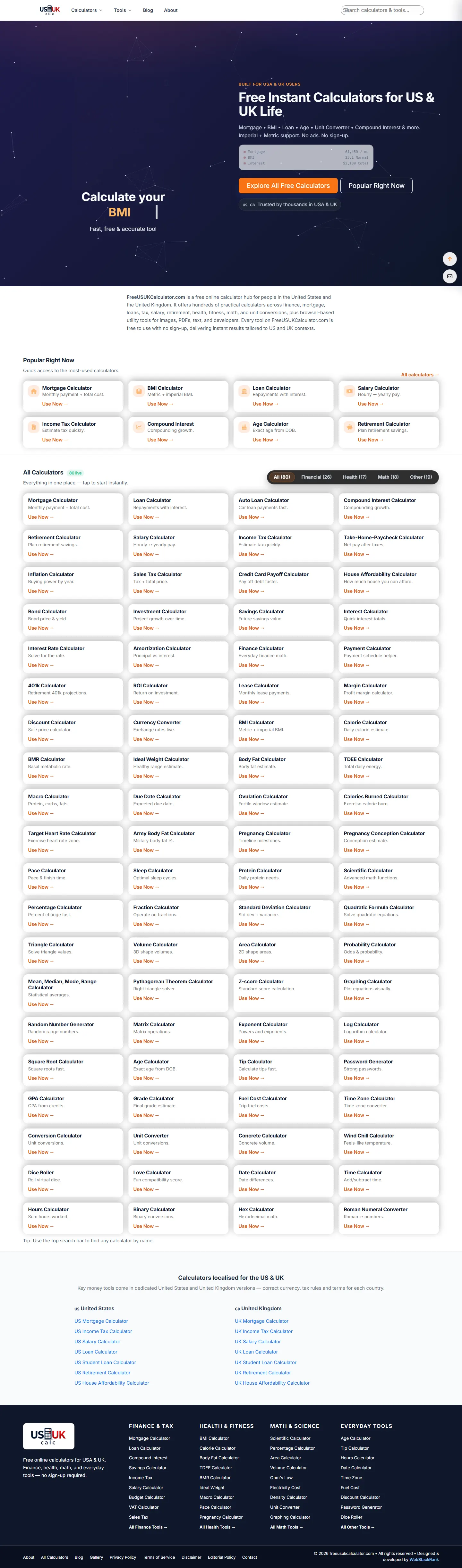
FreeUSUKCalculator answers everyday questions with numbers: what a mortgage costs per month, how much tax comes off a salary, what a BMI is, how compound interest grows, what a date range adds up to. The homepage opens on a working calculator and a directory grouped into finance, health, maths and other everyday tools, each labelled for the United States or the United Kingdom where the rules differ.
A second section, the utilities, covers image conversion and compression, PDF merging and splitting, text and JSON tools, colour and developer helpers: 72 tools in 16 categories that process files entirely in the browser. Nothing is uploaded, nothing is watermarked, and no account is required anywhere on the site.
The engineering problem is breadth with correctness. Two hundred calculators are two hundred sets of assumptions, units and country rules. The build is deliberately light, server-rendered pages with self-contained client-side scripts, so that every tool loads fast on a phone and can be tested and corrected in isolation.

The original challenge
Large calculator sites turn into crowded menus of similar options. Country differences add a second layer: pounds and dollars, imperial and metric, different tax vocabularies. And a stylish result card means nothing if the formula is wrong.
A visitor looking for a UK take-home pay calculator should not scroll past a US sales-tax tool and a BMI chart to find it. The taxonomy and the search path have to do the sorting.
Tax bands change, mortgage conventions differ and health formulas carry caveats. Each tool needs validation, an explanation of what it includes and excludes, and a review date.
Dollar and pound examples, imperial and metric wording and country-specific finance terms must feel native to both audiences without duplicating the whole site.
Image and PDF tools are only trustworthy if files never leave the device. That constraint decides the architecture of the utilities section.
Engineering decisions & solutions
These decisions kept a very wide product simple to run; the outcomes include the audits that are still open.
Hundreds of tools that must load instantly on slow mobile connections.
A client-side application bundle would make every calculator pay for all the others; a visitor who wants a percentage should not download the mortgage engine.
Render each tool page on the server and attach a small, self-contained script for its calculation; no shared client bundle, no framework runtime.
Each calculator page is a complete HTML document with its own script; the Bootstrap-based layout is shared, the logic is not. Results update client-side after the first paint.
Shared behaviour (formatting, validation helpers) is duplicated in places rather than imported from one bundle; the trade is deliberate because isolation makes a broken tool a local problem.
Fast first paint on every tool page; each calculator can be tested and corrected without touching the rest.
Make 238 calculators and 72 utilities findable.
Visitors arrive with a question (how much tax, how many days, what size image); the site has to answer in the vocabulary of the question, not of the formula.
Group calculators by life area (finance and tax, health and fitness, maths and science, everyday), label US and UK variants, and give the utilities their own section grouped by file type.
The homepage directory shows the live calculators in four groups with counts (26 financial, 17 health, 18 maths, 19 other at review), a country section for US and UK calculators, and a link to the full list of 238; the utilities page lists 72 tools across 16 categories such as image, PDF, text, JSON, CSV, colour and developer helpers.
Some tools belong to two groups; we chose one home each plus cross-links instead of duplicating pages.
A popular tool is one click from the homepage; a niche tool is reachable through its group or the full list.
Offer image, PDF and text tools without becoming a file-hosting service.
Uploading personal documents to a free tool is a privacy risk for the visitor and a liability for the operator; processing on the device removes both.
Implement the utilities with web platform APIs so that conversion, compression and PDF manipulation happen in the visitor's browser.
The utilities use HTML5 Canvas for image work, WebCrypto for hashing and encoding helpers and pdf-lib for PDF operations; the page states that every tool processes the file or text in the browser with no upload and no watermark.
Very large files are limited by the visitor's device, and some operations are slower than a server would manage.
72 tools that work offline-friendly and keep files private; a visible privacy promise that the architecture actually enforces.
Serve two markets with different currencies, units and tax rules.
A UK visitor confronted with federal income tax, or a US visitor with VAT, assumes the site is not for them.
Keep one site, localise at the calculator level with country-specific variants and examples, and make the country visible in headings and sections.
Dollar and pound examples, imperial and metric wording and a dedicated US / UK section on the homepage; country-specific calculators (income tax, salary, VAT, sales tax) exist as separate tools.
Country variants double the maintenance of the affected formulas; each needs its own review date and test cases.
Both audiences get native terminology; the review discipline for country rules is an ongoing commitment.
Main features
Everything here is visible on the public site as of the review date; the catalogue counts are the site's own labels, not an independent item-by-item audit.
Technical architecture
There is no application framework on the public pages. Each calculator is a server-rendered HTML document with a Bootstrap-based layout and a self-contained script for its logic, which keeps the initial paint immediate and the failure domain of any bug limited to one tool.
The utilities section is the technically richer half: image, PDF, text and developer tools built on web platform APIs so that files are processed on the visitor's device. That choice is what makes the privacy promise true rather than a line in a policy.
What we deliberately leave out: hosting, analytics configuration and any monetisation details are not described.
| Layer | What is in place |
|---|---|
| Pages | Server-rendered HTML per tool; shared Bootstrap layout; no client-side application bundle |
| Calculation | Self-contained client-side JavaScript per calculator with input validation and explanations |
| Utilities | HTML5 Canvas (images), pdf-lib (PDF), WebCrypto (hashing/encoding): processed in the browser, no upload |
| Localisation | US and UK variants at the calculator level; currency, units and tax vocabulary per tool |
| Discovery | Grouped directory with live counts, popular-tools strip, full list of 238, utilities index with 16 categories |
| Content | Explanations, examples and disclaimers per tool; editorial policy and disclaimer pages |
| Accounts | None; the site is usable without sign-up or cookies for core use |
User experience & responsive design
Genuine screenshots of the public site captured on 23 October 2026. Hover and click any image to open it in the viewer; click again for actual size.
The homepage opens on an interactive calculator and a popular-tools strip, so the first interaction is a result, not a menu.
Group names read like life areas (finance and tax, health, maths) and the country sections say US or UK in the heading.
Each tool shows what it includes and excludes and gives an example, so a result can be acted on rather than guessed at.
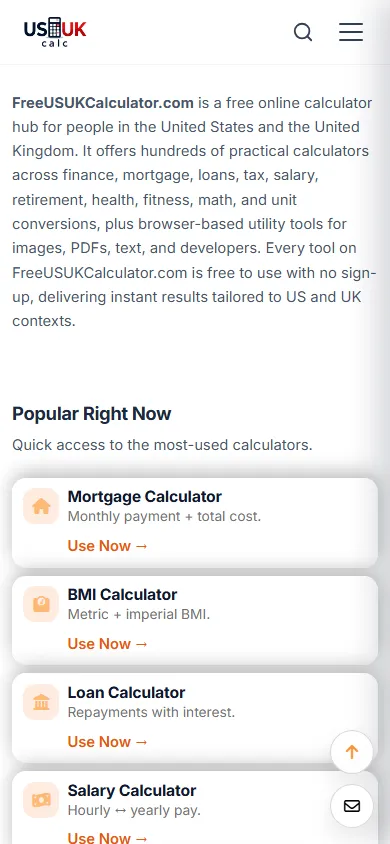
Numeric keyboards, one column of inputs, large results and no modal dialogs keep calculators usable on a phone.
The utilities page states that files stay in the browser, next to the tools that make it true.
Headings outline each page, inputs are labelled, and results are announced in the document rather than drawn in a canvas.
Technical challenges & resolutions
Each row records how it was verified and what remains open. Items marked as recommendations have not been implemented yet.
| Challenge | Root cause / constraint | Solution | Verification | Result or remaining limitation |
|---|---|---|---|---|
| Tool pages loading slowly on mobile data | Early builds shared one large script across tools | Server-rendered pages with per-tool scripts and no shared bundle | Throttled mobile profiling of representative pages | First paint is immediate; formal Core Web Vitals reporting is a recommendation |
| Visitors could not find the right calculator | A single long list of tools | Grouped directory with counts, popular strip, US/UK section, full list | Navigation review of each group; search-engine entry per tool checked | Delivered; usage data per path is not published |
| File tools implied uploads | Conventional server-side processing | Browser-side processing with Canvas, pdf-lib and WebCrypto | Network inspection confirms no file upload during tool use | 72 browser-side tools live |
| Catalogue counts drifted between pages | Counts maintained by hand in several places | Live counts in the directory; advertised totals reconciled on review | Public labels checked on 23 October 2026 | The site advertises 238 calculators and marks 80 live; the remaining pages are being audited (open item) |
| Country rules go stale | Tax bands and thresholds change each year | Separate US and UK tools with per-tool explanations | Not yet systematic | Recommendation: attach revision dates and reference formulas to every tax-related calculator |
Estimated market development cost
What it would cost to commission a library of this breadth today: a lightweight page system, calculation logic with explanations for hundreds of tools, browser-side file utilities, country handling and the QA discipline that keeps formulas correct. Editorial estimates for comparable work, not quotes.
Comparable scope, 2026 market range
AED 70,000 – 215,000
Roughly 450–900 hours of design, engineering, QA, documentation and deployment at a blended agency rate; scope-dependent.
The range assumes the full advertised catalogue; a library with a few dozen calculators would sit well below it.
Illustrative market development estimate for a comparable scope. This is not the actual project invoice, historical development cost or amount charged to a client.
| Comparable delivery component | Estimated range (AED) |
|---|---|
| UI/UX, tool taxonomy and search | 8,000 – 22,000 |
| Calculation logic, inputs and explanations | 30,000 – 95,000 |
| File and developer utility modules (browser-side) | 15,000 – 50,000 |
| Structured content, SEO and country handling | 7,000 – 18,000 |
| Formula QA, deployment and maintenance setup | 10,000 – 30,000 |
Component ranges are illustrative phase allocations, not measured hours or invoices. Third-party subscriptions, paid APIs, content production, hosting and marketing are excluded. Market context: Clutch web development pricing guide (Sept 2026), Dubai website cost comparison (Sept 2026) — editorial estimates by WebStackRank, not independently obtained quotes.
Results & outcomes
The outcomes below can be checked on the site. Traffic and ranking figures are not published here.
238 calculators advertised with 80 marked live in the directory at review, grouped by finance, health, maths and everyday use, with US and UK variants.
Image, PDF, text, data, colour and developer tools across 16 categories that process files on the device.
Every tool works without an account; the file tools never send a file to a server.
Server-rendered documents with self-contained scripts: immediate first paint and a one-tool failure domain.
Per-tool explanations and examples, plus editorial policy and disclaimer pages.
The homepage directory shows live counts; advertised totals are reconciled on review rather than left to drift.
What this page does not claim: accuracy guarantees, traffic, rankings or revenue. The catalogue counts are the site's own labels on the review date and the formula audit is still in progress.
Lessons learned
Project status
Live · expanding library
The site is live and free to use without an account. It advertises 238 calculators; the homepage directory marks 80 of them as live across four groups at the time of review, alongside a separate section of 72 browser-side utilities in 16 categories. The library is still being expanded and audited tool by tool.
Status and figures reviewed on 23 October 2026 against the public site. FreeUSUKCalculator is an in-house product owned and operated by the WebStackRank founder.
Related projects



Whether you're planning a booking platform, SaaS product, business website or custom application, WebStackRank can help you turn the idea into a practical, maintainable digital product.
How would you like to reach us?
Thanks for chatting!
It was lovely to connect. Come back anytime — our starter packages and their 3 months free maintenance are on the pricing page whenever you're ready. See you again!
See the pricing page